
Every printer in your farm, on one wall.
3D Print Farm Sanity watches every printer on your network and shows them on one Video Wall, like a security monitor: each printer's live camera with its status on top. You see what's printing, what's finished, and what needs a person, at a glance. It only reads from your printers. It never starts, stops, heats or moves anything.
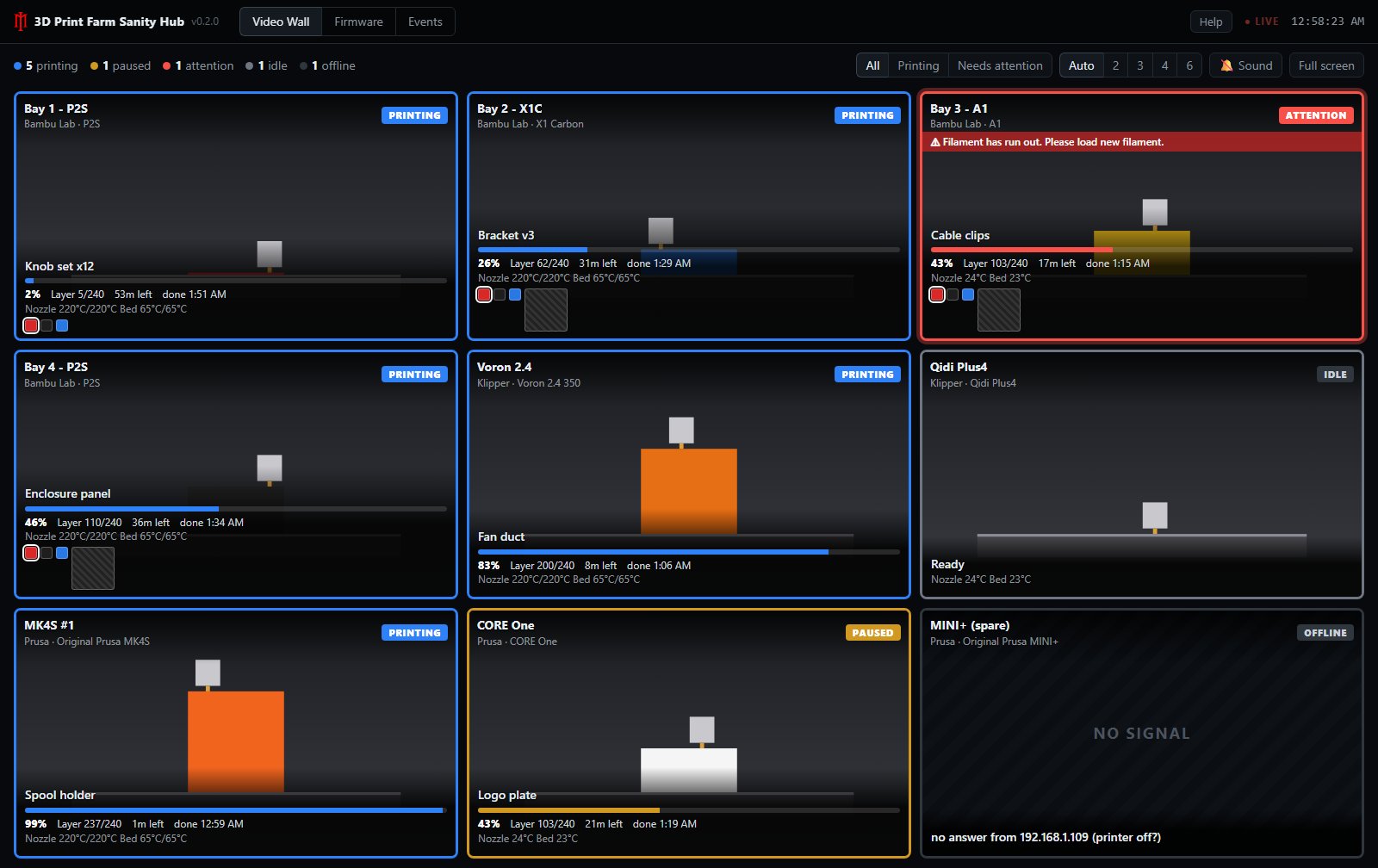
The real Video Wall (Hub edition), showing its built-in demo farm of pretend printers. Click a tile for that printer full size: live video and every detail.
What it does
The Video Wall
One camera tile per printer with name, state, job, percent, layer, time left, finish time, temperatures and filament colours. Coloured border and words: printing, paused, finished, failed, needs attention, idle, offline.
Alerts that make sense
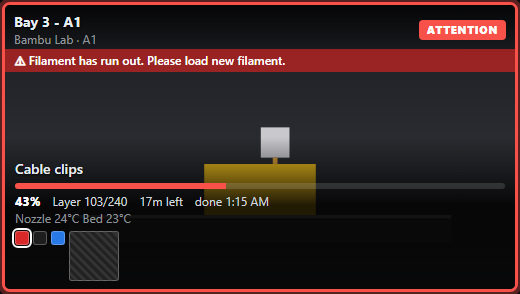
Finished, failed, paused, needs attention, went offline. Printer error codes become plain English, like "Front door open" or "Filament ran out", on the tile and in the event list.
On your phone
Anyone on your network can open the wall in a phone browser. Password only, with lock-out after wrong tries. Nothing to install on the phone.
Firmware at a glance
Every printer's firmware and parts in one list, and which printers are behind others of the same model.
Mixed farms
Bambu Lab next to Prusa next to a Voron next to an Ender on OctoPrint. One wall, one look, whatever the brand.
Light on your network
The wall takes one picture per printer every few seconds and plays full video only for the printer you open. WebRTC cameras play straight from the printer.
Read-only, local, yours
- Never sends a command. No start, stop, pause, heat, move or G-code: it only asks printers for their status.
- Stays on your network. It talks to each printer directly. No cloud account, and nothing about your farm leaves your building. It only goes online for two small things, both of which you can switch off: Bambu Lab's message texts, fetched from Bambu's own server once a day, and a once-a-day check for a new version.
- Leaves your printers alone. Bambu Lab printers stay in normal mode: no LAN-only or Developer Mode. Nothing is installed on any printer.
- Secrets stay locked. Access codes and passwords are kept in a settings file only the app can read, and are never shown again once saved.
Printers it watches
- Bambu Lab P2S, X1, H2, X2, P1, A1
- Prusa MK4, MK3.9, XL, MINI+, CORE One
- Klipper Voron, RatRig, Qidi, Sovol, Snapmaker U1
- OctoPrint Ender, CR-10, MK3 and most Marlin printers
- Creality K1, K2, Hi, Ender-3 V3
- Elegoo Centauri Carbon, Centauri Carbon 2
- Anycubic Kobra 3, S1, Kobra 4, Kobra X
- Flashforge Adventurer 5M, AD5X
- Duet RepRapFirmware 3
Some printers need a setting switched on first (for example LAN mode on Anycubic, Flashforge and Centauri Carbon 2). The app's Help lists exactly what each one needs and which models have been tested on real hardware.
Two editions, same wall
3D Print Farm Sanity for Windows
Run it on any office PC. One file, nothing to install. The wall opens in its own window, and phones on the network can view it while it's open.
3D Print Farm Sanity Hub
An always-on box: a Raspberry Pi 4 / 5 or any Linux machine. It serves the wall to phones and browsers, and full-screen on a TV plugged into it.
Status: alpha. 3D Print Farm Sanity is running on a real print farm now and isn't for sale yet. Pricing and downloads are coming.